PyLadies Line Bot Workshop Kaohsiung

Pyladies Taiwan

Speaker : Mars

2017/05/27

Roadmap

  • 午餐機器人-基礎語法
    • 第一個Python程式
    • 字串與物件
    • 判斷式
    • 串列
    • 迴圈
    • 函式
  • 點歌機器人-網路爬蟲
    • 啟用Google API
    • 抓取資料
    • 字典
    • 解析資料
    • 字串 replace 功能

午餐機器人-基礎語法

第一個Python程式

練習環境:https://repl.it/languages/python3

In [1]:
print("Hello")
Hello

print(物件) 是將物件印出到螢幕上的內建「函式」
"Hello" 是一個物件,型別是「字串(str)」

函式稍後會再細講,我們先來看看物件

字串與物件

字串型別

字串要用成對的雙引號或是單引號,可利用相加來串連

In [2]:
print("Hello")
print('Hello')
print("Hello" + " " + "World")
Hello
Hello
Hello World

如果沒用引號,程式可能會認為是

  • 數值型別的物件
  • 命名物件
In [3]:
print("111"+"222")
print(111+222)
111222
333
In [4]:
print("3.14"+"1.59")
print(3.14+1.59)
3.141.59
4.73
In [5]:
print("Hello")
print(Hello)   # 一個名稱叫做Hello的物件(但因為從來沒有出現過,程式不知道是什麼)
Hello
---------------------------------------------------------------------------
NameError                                 Traceback (most recent call last)
<ipython-input-5-f853250e53bd> in <module>()
      1 print("Hello")
----> 2 print(Hello)   # 一個名稱叫做Hello的物件(但因為從來沒有出現過,程式不知道是什麼)

NameError: name 'Hello' is not defined

數值型別

運算元:+ - * / % **

  • 整數 integer:int
  • 小數 float:float
In [6]:
print (10*3)  # 乘法
print (10/3)  # 除法
print (10%3)  # 取餘數
print (10**3) # 次方
30
3.3333333333333335
1
1000

命名物件

名稱 = 資料內容

  • 可以命名的字元:_、0~9、a~Z
  • 不能以數字開頭
  • 不能與保留字相同(ex: print ...)
  • 大小寫有別
  • 好的命名方式會讓程式碼容易閱讀
    • xyz = "http://blog.marsw.tw" vs.
      url = "http://blog.marsw.tw"
In [7]:
Hello = "Hi"
print(Hello)
Hi

名稱 = 資料內容

上面的語法,在Python中代表的意義是,
我們在右邊的「資料內容」存放位置貼上左邊「名稱」的標籤。
更改資料內容,就會是把這張標籤撕下來,黏到另外一個位置去。

  • 與其他語言,是直接把這個位置的內容物換掉的概念不太一樣
  • 沒有命名的物件,會馬上被丟棄
In [8]:
# 用id(物件)可看到這個物件的存放位置
a=3 
print(id(a))

a=4
print(id(a))
10105888
10105920

為什麼要用命名物件?

  • 資料可以重複利用
  • 需要知道存放資料的位置

資料可以重複利用

In [9]:
print("Hello")
print("Hello World")
print("Hello PyLadies")
Hello
Hello World
Hello PyLadies
In [10]:
greeting_word = "Hello"
print(greeting_word)
print(greeting_word+" World")
print(greeting_word+" PyLadies")
Hello
Hello World
Hello PyLadies

需要知道存放資料的位置

In [11]:
first_word=input("first_word=")
second_word=input("second_word=")
print(first_word+second_word)
first_word=Hello
second_word=PyLadies
HelloPyLadies

input(提示字)是輸入函式,
從程式執行畫面由鍵盤中輸入,輸入的資料會被儲存成字串型態。
而在 Line Bot 中,因為會與 Line 背後的系統串接,會是用另外的輸入方式。

判斷式:if/elif/else

  • 如果判斷條件為True,就執行縮排內的程式碼;為False就不執行。
  • if是判斷式必備的,每一個新的if就是一組新的判斷式
    • if:一種選項,滿足條件,才執行某動作
    • if + else:兩種選項,滿足條件與其他狀況(不滿足條件),各執行某動作
    • if + elif:兩種選項,滿足各條件,各執行某動作
    • if + elif + (elif)... + (else):多種選項,滿足各條件,各執行某動作
  • 邏輯運算元:and、or、not
In [12]:
print(11>8)
print(11%2==0)
True
False
In [13]:
a = 11
b = 8
# 第1組判斷式
if (a>b) and (a%2==0):
    print ("a>b , a is even")
elif (a>b):
    print ("a>b , a is odd")
else:
    print ("a<=b")
print ("這是判斷式外的區塊")
a>b , a is odd
這是判斷式外的區塊

=,代表的是將某個資料內容(右)貼上標籤(左),
a=3代表的是將儲存3的地方貼上標籤a,即標籤a的資料內容是3。

==,則是代表判斷左右兩邊的資料內容是否相等,
a==3代表的是標籤a的內容是否與3相等。

「縮排」(四個空白)是Python非常重要的一個觀念,
程式是用縮排,來斷定程式碼屬於那一個區塊,同時也兼顧了易讀性。

In [14]:
cost = 1000
gift = ""
# 第1組判斷式
if cost>=500:   # 滿500,送購物袋
    gift = gift+"購物袋"
# 第2組判斷式
if cost>=1000:  # 滿1000折100
    cost = cost-100
print(cost)
print(gift)
900
購物袋

想想看聊天機器人、Siri...,
這些是要用幾組判斷式呢?

Coding Time

先在repl.it上練習,之後再整合到Line機器人

  • 如果輸入「想吃飯」,會印出「建議你可以吃??」,
    否則就印出「我聽不懂你在說什麼!」
  • 接續前面,輸入「想吃飯」、「不想吃這個」、「換一個」,
    都會印出「建議你可以吃??」
  • 接續前面,如果輸入「我很滿意你的服務」,
    印出「希望你有個愉快的一餐」

大概有抓到機器人回話的方式了吧~
我們還剩產生推薦餐廳的程式碼。

另外,會不會覺得
「想吃飯」、「不想吃這個」、「換一個」用or串接,程式碼很長呢?

串列

串列名稱 = [ 第一個物件, 第二個物件, 第三個物件.....]

  • 可以同時存很多個元素的物件型態,每個元素用,來串接
  • 串列中每個元素可以不一定都要同一個型態
  • 可利用串列名稱.append(物件),在串列最後方增加物件
  • 串列[索引(index)],可拿到該索引位置的物件:Python中是從0開始正向數的;或者可從最後面-1,開始倒著數
In [15]:
choice = ["麥當勞", 711, "烏龍麵"]
print("The 2nd choice is",choice[1])
choice.append("自助餐")  # choice = ["麥當勞", 711, "烏龍麵", "自助餐"]
print("The 2nd-last choice is",choice[-2])
The 2nd choice is 711
The 2nd-last choice is 烏龍麵

「字串」 其實是 "每個元素都是一個字母" 的 「串列」

In [16]:
my_string = "PyLadies Taiwan"
print("The 1st  element of my_string = ",my_string[0])
print("The 8th  element of my_string = ",my_string[7])
print("The last element of my_string = ",my_string[-1]) 
The 1st  element of my_string =  P
The 8th  element of my_string =  s
The last element of my_string =  n

字串&串列,可通用的功能

  • len(字串/串列):計算長度
  • (字串/串列).count:計算某個物件出現過幾次
  • in:判斷某個物件是否存在字串/串列中
In [17]:
my_string = "PyLadies Taiwan"
print("Length of my_string = ",len(my_string))
print("The time 'a' appears in my_string = ",my_string.count('a'))
print("Py" in my_string)
Length of my_string =  15
The time 'a' appears in my_string =  3
True
In [18]:
my_list = ["a",2016,5566,"PyLadies",2016,2016.0]
print("Length of my_list = ",len(my_list))
print("The time '2016' appears in my_string = ",my_list.count(2016))
print(2017 in my_list)
Length of my_list =  6
The time '2016' appears in my_string =  3
False

產生隨機值

  • 裝備random工具箱
  • 使用工具箱中的randint工具:產生一隨機數字(起始值<=隨機數<=結束值)
    • randint(起始值,結束值)
In [19]:
import random
choice = ["麥當勞", "7-11", "烏龍麵", "自助餐"]
index = random.randint(0,len(choice)-1)
print(choice[index])
7-11

串列的長度是len(串列),上面的程式碼中串列長度為4,
我們要隨機產生串列中的可能,而索引是從0開始數,最後一個物件的索引是3,
所以結束值就是「串列長度-1」

Coding Time

先在repl.it上練習,之後再整合到Line機器人

  • 「想吃飯」、「不想吃這個」、「換一個」改用串列的方式寫
  • 撰寫自己的餐廳列表,隨機產生一間餐廳,替換「建議你可以吃??」的「??」

迴圈

重複執行的好方法

  • 簡化程式碼
  • 拿取串列元素

In [20]:
for i in range(3):
    print(i)
0
1
2
In [21]:
chg_word = ["想吃飯","不想吃這個","換一個"]
In [22]:
for i in range(len(chg_word)):
    print(chg_word[i])
想吃飯
不想吃這個
換一個
In [23]:
for i in chg_word:
    print(i)
想吃飯
不想吃這個
換一個
In [24]:
# 假設我今天輸入的訊息是「想吃飯」
print("想吃飯" in chg_word)
# 假設我今天輸入的訊息是「我想吃飯」
print("我想吃飯" in chg_word)
True
False
In [25]:
# 但其實「我想吃飯」包含了「想吃飯」這個子字串
print("想吃飯" in "我想吃飯")
True
In [26]:
msg = "我想吃飯"
print("想吃飯" in msg)
print("不想吃這個" in msg)
print("換一個" in msg)
True
False
False

看起來一模一樣的事情,卻要重複做很多次, 這個時候迴圈就能幫上很大的忙:

我們可以將比較簡短的句子,用串列儲存他們,
當輸入一個訊息的時候,就把串列中每個簡短的句子拿出來跟訊息比對,

In [27]:
chg_word = ["想吃飯","不想吃這個","換一個"]
msg = "我想吃飯"
for i in chg_word:
    print(i in msg)
True
False
False

看看訊息是否有包含其中一個簡短的句子,
如果有比對到一個,就算比對成功,否則就算失敗(意即全部都沒有比對到)。

In [28]:
chg_word = ["想吃飯","不想吃這個","換一個"]
msg = "我想吃飯"
find = False
for i in chg_word:
    if i in msg:
        find = True
print(find)
True

Coding Time

先在repl.it上練習,之後再整合到Line機器人

  • 「想吃飯」、「不想吃這個」、「換一個」改用串列結合迴圈的方式寫,讓機器人可以支援子字串比對功能。

函式

  • 自己打造工具
  • 程式碼更為簡潔
  • 方便重複利用
In [ ]:
def 函式名稱(傳遞的參數.可為空):
    函式中要做的事
    函式中要做的事
    函式中要做的事

!注意

  • 常會配合return傳回資料。

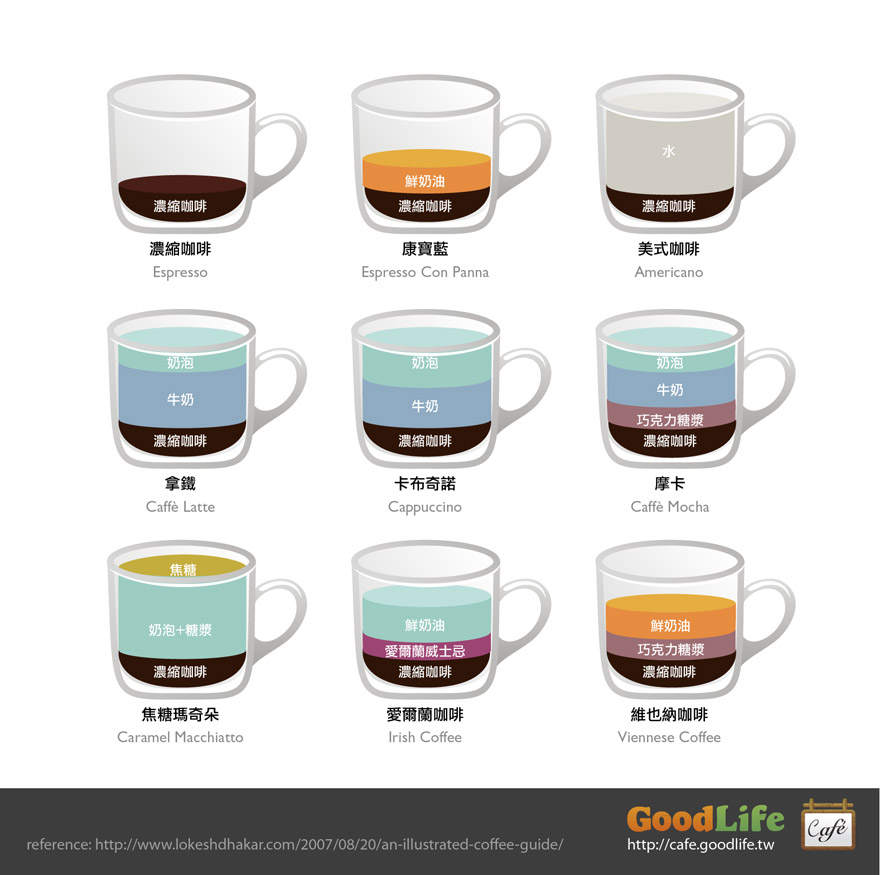
  • 去咖啡機弄一杯咖啡
  • 打開開關
  • 放下杯子
  • 選擇「咖啡類別」,按下製作
  • 咖啡機「製作咖啡」
  • 得到一杯咖啡
In [ ]:
def 製作咖啡(咖啡類別):
    加入濃縮咖啡
    if 咖啡類別=="美式咖啡":
        加入很多的水
    elif 咖啡類別=="拿鐵" or 咖啡類別=="Latte":
        加入很多的牛奶.還有一些奶泡
    elif 咖啡類別=="卡布奇諾":
        加入一些牛奶.還有一些奶泡
    .
    .
    .
    return 咖啡
In [29]:
chg_word = ["想吃飯","不想吃這個","換一個"]
msg = "我想吃飯"
find = False
for i in chg_word:
    if i in msg:
        find = True
print(find)
True
In [30]:
end_word = ["滿意","謝謝你"]
msg = "我很滿意你的服務"
find = False
for i in end_word:
    if i in msg:
        find = True
print(find)
True
In [31]:
def has_keyword(msg,word_list):
    find = False
    for i in word_list:
        if i in msg:
            find = True
    return find
In [32]:
chg_word = ["想吃飯","不想吃這個","換一個"]
msg = "我想吃飯"
print(has_keyword(msg,chg_word))
True

Coding Time

先在repl.it上練習,之後再整合到Line機器人

  • 將判定關鍵詞是否出現的程式碼,改為函式。
  • 將產生餐食選項的程式碼,改為函式:可以分別成家裡、公司推薦的餐廳清單

可以在 https://github.com/MarsW/linebot-pyladies/commits/master
看到剛才大家如何一步步學習、修改程式碼,完成自己的午餐機器人~

點歌機器人-網路爬蟲

啟用Google API

建立 Google API 金鑰

API 管理員 > 憑證 > 建立專案 > 建立憑證 > API 金鑰 > 複製金鑰> 關閉

啟用 Google 各服務 API

資料庫 > YouTube Data API 、 Google Places API Web Service > 啟用

抓取資料

In [33]:
import requests
rep = requests.get("https://www.googleapis.com/youtube/v3/search?part=snippet&q=破浪&key=你的金鑰")
html = rep.text
print (html)
{
 "kind": "youtube#searchListResponse",
 "etag": "\"m2yskBQFythfE4irbTIeOgYYfBU/P3SH9q6LOJhZ08pK1nkJa5A36Vs\"",
 "nextPageToken": "CAUQAA",
 "regionCode": "JP",
 "pageInfo": {
  "totalResults": 3186,
  "resultsPerPage": 5
 },
 "items": [
  {
   "kind": "youtube#searchResult",
   "etag": "\"m2yskBQFythfE4irbTIeOgYYfBU/dzD-J_rpmDSKKbfLaBuAJJ1BO2g\"",
   "id": {
    "kind": "youtube#video",
    "videoId": "ACVV_DkpQZ0"
   },
   "snippet": {
    "publishedAt": "2015-08-08T12:00:03.000Z",
    "channelId": "UCod5qO8rQOlUD4qLt_RVeIA",
    "title": "::首播 ::   破浪  2015全國高中生大合唱(官方正式版)",
    "description": "破浪-2015高中原創畢業歌合輯粉絲專頁: https://www.facebook.com/singoursong2015 2015年夏天31所高中18歲的這年用夢想為青春唱出對夢想的渴望用堅持...",
    "thumbnails": {
     "default": {
      "url": "https://i.ytimg.com/vi/ACVV_DkpQZ0/default.jpg",
      "width": 120,
      "height": 90
     },
     "medium": {
      "url": "https://i.ytimg.com/vi/ACVV_DkpQZ0/mqdefault.jpg",
      "width": 320,
      "height": 180
     },
     "high": {
      "url": "https://i.ytimg.com/vi/ACVV_DkpQZ0/hqdefault.jpg",
      "width": 480,
      "height": 360
     }
    },
    "channelTitle": "王風箏",
    "liveBroadcastContent": "none"
   }
  },
  {
   "kind": "youtube#searchResult",
   "etag": "\"m2yskBQFythfE4irbTIeOgYYfBU/H2zDOI2FKVCHddz_0Y3ZOXISPZY\"",
   "id": {
    "kind": "youtube#video",
    "videoId": "DgCwNlZRca4"
   },
   "snippet": {
    "publishedAt": "2016-06-08T17:25:13.000Z",
    "channelId": "UC3hZNmLXj7BqSyoUPeL4apg",
    "title": "破浪 (歌詞)",
    "description": "大家好我是HIM 今天我又來用Moive Maker了這次是把[破浪]這首歌來編輯當作是一種練習原影片:https://www.youtube.com/watch?v=ACVV_DkpQZ0 那有什麼好玩 ...",
    "thumbnails": {
     "default": {
      "url": "https://i.ytimg.com/vi/DgCwNlZRca4/default.jpg",
      "width": 120,
      "height": 90
     },
     "medium": {
      "url": "https://i.ytimg.com/vi/DgCwNlZRca4/mqdefault.jpg",
      "width": 320,
      "height": 180
     },
     "high": {
      "url": "https://i.ytimg.com/vi/DgCwNlZRca4/hqdefault.jpg",
      "width": 480,
      "height": 360
     }
    },
    "channelTitle": "HIM 阿銀",
    "liveBroadcastContent": "none"
   }
  },
  {
   "kind": "youtube#searchResult",
   "etag": "\"m2yskBQFythfE4irbTIeOgYYfBU/RpmNAsgxZBSrkYnoZo3SK5LplDU\"",
   "id": {
    "kind": "youtube#video",
    "videoId": "KJjHW9vmxoo"
   },
   "snippet": {
    "publishedAt": "2017-02-13T13:53:14.000Z",
    "channelId": "UCEkSuspTTNZtoRFJnlhlmng",
    "title": "破浪 伴奏KTV",
    "description": "如有侵權敬請告知.",
    "thumbnails": {
     "default": {
      "url": "https://i.ytimg.com/vi/KJjHW9vmxoo/default.jpg",
      "width": 120,
      "height": 90
     },
     "medium": {
      "url": "https://i.ytimg.com/vi/KJjHW9vmxoo/mqdefault.jpg",
      "width": 320,
      "height": 180
     },
     "high": {
      "url": "https://i.ytimg.com/vi/KJjHW9vmxoo/hqdefault.jpg",
      "width": 480,
      "height": 360
     }
    },
    "channelTitle": "張睿璿",
    "liveBroadcastContent": "none"
   }
  },
  {
   "kind": "youtube#searchResult",
   "etag": "\"m2yskBQFythfE4irbTIeOgYYfBU/tknTJw4REq2HKFmuddR46Ef5Om8\"",
   "id": {
    "kind": "youtube#video",
    "videoId": "yx0ZzV8QIls"
   },
   "snippet": {
    "publishedAt": "2017-03-03T13:47:31.000Z",
    "channelId": "UC1OyU3oETy7OIMjapmPaf4g",
    "title": "破浪",
    "description": "",
    "thumbnails": {
     "default": {
      "url": "https://i.ytimg.com/vi/yx0ZzV8QIls/default.jpg",
      "width": 120,
      "height": 90
     },
     "medium": {
      "url": "https://i.ytimg.com/vi/yx0ZzV8QIls/mqdefault.jpg",
      "width": 320,
      "height": 180
     },
     "high": {
      "url": "https://i.ytimg.com/vi/yx0ZzV8QIls/hqdefault.jpg",
      "width": 480,
      "height": 360
     }
    },
    "channelTitle": "景丹怡 景丹怡",
    "liveBroadcastContent": "none"
   }
  },
  {
   "kind": "youtube#searchResult",
   "etag": "\"m2yskBQFythfE4irbTIeOgYYfBU/Km-DGqowXNs21pRmuvt9lF6uav8\"",
   "id": {
    "kind": "youtube#video",
    "videoId": "j_tt8XaN5iE"
   },
   "snippet": {
    "publishedAt": "2015-08-09T04:12:01.000Z",
    "channelId": "UC1928CRQVHI96bG0-eA1xPg",
    "title": "(歌詞版)破浪-2015全國高中生大合唱",
    "description": "",
    "thumbnails": {
     "default": {
      "url": "https://i.ytimg.com/vi/j_tt8XaN5iE/default.jpg",
      "width": 120,
      "height": 90
     },
     "medium": {
      "url": "https://i.ytimg.com/vi/j_tt8XaN5iE/mqdefault.jpg",
      "width": 320,
      "height": 180
     },
     "high": {
      "url": "https://i.ytimg.com/vi/j_tt8XaN5iE/hqdefault.jpg",
      "width": 480,
      "height": 360
     }
    },
    "channelTitle": "鄭婷方",
    "liveBroadcastContent": "none"
   }
  }
 ]
}

字典 dict

  • 鍵值key:很像是串列的索引,
  • 設定值:字典名稱[key]=value
  • 拿取值:字典名稱[key]
  • key:value
    {
      "the":10 ,
      "a"  :9  ,
      "of" :6  ,
      "in" :6
    }

!注意

  • 字典是「非有序」的型別
  • 字典是存key,然後以key去找資料value
In [34]:
my_dict = {}
my_dict["the"] = 10
my_dict["a"] = 9
my_dict["of"] = 6
my_dict["in"] = 6
my_dict2 = {"the":10,"a":9,"of":6,"in":6}
print (my_dict)
print (my_dict2)
print (my_dict["the"])
{'of': 6, 'a': 9, 'the': 10, 'in': 6}
10

!注意

  • 直接使用字典不存在的key去找資料會有錯誤!
In [35]:
my_dict = {"the":10,"a":9,"of":6,"in":6}
print ("with" in my_dict)
print (my_dict["with"])
False
---------------------------------------------------------------------------
KeyError                                  Traceback (most recent call last)
<ipython-input-35-bfa4e840c783> in <module>()
      1 my_dict = {"the":10,"a":9,"of":6,"in":6}
      2 print ("with" in my_dict)
----> 3 print (my_dict["with"])

KeyError: 'with'

解析資料

In [36]:
import json
data = json.loads(html)
# print (data['items'])
for i in data['items']:
    video_id = i['id']['videoId']
    video_url = "https://www.youtube.com/watch?v="+video_id
    print (i['snippet']['title'],video_url)
::首播 ::   破浪  2015全國高中生大合唱(官方正式版) https://www.youtube.com/watch?v=ACVV_DkpQZ0
破浪 (歌詞) https://www.youtube.com/watch?v=DgCwNlZRca4
破浪 伴奏KTV https://www.youtube.com/watch?v=KJjHW9vmxoo
破浪 https://www.youtube.com/watch?v=yx0ZzV8QIls
(歌詞版)破浪-2015全國高中生大合唱 https://www.youtube.com/watch?v=j_tt8XaN5iE
In [37]:
first = data['items'][0]
title = first['snippet']['title']
video_id = first['id']['videoId']
video_url = "https://www.youtube.com/watch?v="+video_id
print (title,video_url)
::首播 ::   破浪  2015全國高中生大合唱(官方正式版) https://www.youtube.com/watch?v=ACVV_DkpQZ0

Coding Time

先在repl.it上練習,之後再整合到Line機器人

  • 練習以上網路爬蟲部分的程式碼,留下Youtube第一個結果的網址的程式碼
  • 想想看,如果我想要讓歌名可以依照我的輸入改變,而不是寫死在程式碼中,可以怎麼做
    • 命名物件
    • 函式
In [38]:
import requests
import json
def get_song_youtube_url(keyword):
    url = "https://www.googleapis.com/youtube/v3/search?part=snippet&q={}&key=你的金鑰".format(keyword)
    rep = requests.get(url)
    html = rep.text
    data = json.loads(html)
    first = data['items'][0]
    title = first['snippet']['title']
    video_id = first['id']['videoId']
    video_url = "https://www.youtube.com/watch?v="+video_id
    return video_url

song_url = get_song_youtube_url("破浪")
print (song_url)
https://www.youtube.com/watch?v=ACVV_DkpQZ0

字串 replace 功能

  • 處理後字串 = 原字串.replace(舊字串,新字串[,最多替換次數]):將「原字串」中「舊字串」都取代為「新字串」,產生「處理後字串」
  • 最多替換次數可以省略,省略的話就是把全部都取代掉
In [39]:
old_string = "PyLadies Taiwan"
new_string = old_string.replace("a","A")
print (new_string)
new_string = old_string.replace("a","A",1)
print (new_string)
new_string = old_string.replace("La","")
print (new_string)
PyLAdies TAiwAn
PyLAdies Taiwan
Pydies Taiwan

Coding Time

先在repl.it上練習,之後再整合到Line機器人

  • 設定自己的關鍵字 ex. 「我想聽 OO」、「來一首 XX」,以字串處理留下歌名